You’re always in
control.
Choose whether you see personalized offers, or remove Daily Recipes Online from Microsoft Edge at any time.
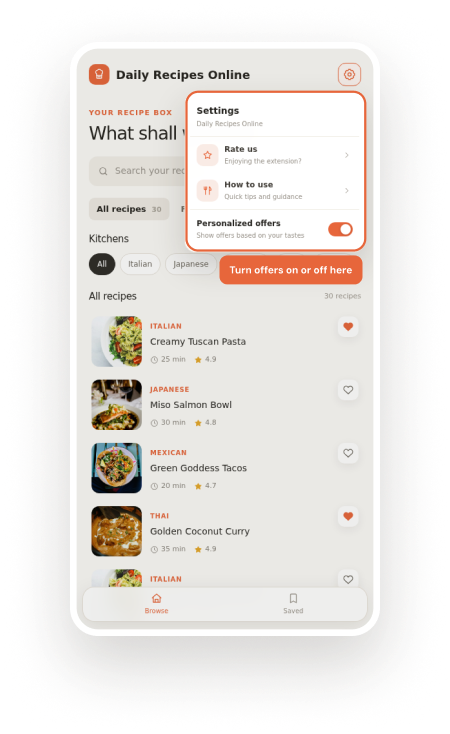
Turn offers on or off
whenever you like.
Personalized offers may be based on the kitchens and recipes you browse. This setting is optional and takes only a few seconds to update.
Open Daily Recipes Online
Select the extension icon in your Edge toolbar to open the sidebar.
Open Settings
Select the settings icon in the top-right corner of the sidebar.
Update personalized offers
Use the switch to turn offers on or off. Your choice is applied immediately.
 Daily Recipes Online⋮Daily Recipes Online
This can read and change site data
Remove it from your
Edge toolbar.
You can uninstall Daily Recipes Online directly from the extension icon beside your browser’s address bar.
Right-click the extension icon
Right-click — or press and hold — the Daily Recipes Online icon to the right of the address bar.
Select “Remove from Microsoft Edge”
Choose the removal option from the extension menu.
Select Remove to confirm
Microsoft Edge will uninstall the extension immediately.
Alternative: Open edge://extensions, find Daily Recipes Online, and select Remove.
Questions about your privacy choices?
Read how Daily Recipes Online handles data and keeps your preferences optional.